Template:Featured Article: Difference between revisions
Jump to navigation
Jump to search
Remind me to revert this after Halloween. Tag: Reverted |
Christmas over, Elec'n will now ring in the New Year |
||
| (33 intermediate revisions by 2 users not shown) | |||
| Line 1: | Line 1: | ||
<div id="mp-tfa" style="padding: | <div id="mp-tfa" style="padding:10px"/>[[File:Elec'n.png|250px|Official artwork of a Elec'n from ''[[Mega Man 3]]''|left|link=Elec'n]] | ||
''' | The '''Elec'n''' is an [[Enemies|enemy]] from ''[[Mega Man 3]]'' originating from [[Spark Man]]'s normal and Doc Robot stage. It will hover forward and shoot 8 sparks at the [[Characters|player]] if nearby. A skin that shoots fireworks was added in [[1.10.4]]. | ||
'''[[ | It can be set to move left or right in the [[Level Builder]] and can also be set to either move forward after spawning or spawn from above the screen. If it is set to spawn from above the screen, it will only appear if the player approaches the area from where it will spawn. Once this condition is met, it will resume its normal behavior after dropping down. | ||
'''[[Elec'n|Continue reading...]]'''<noinclude>[[Category:Templates]]</noinclude> | |||
Latest revision as of 19:31, 7 January 2026
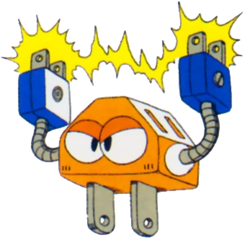
The Elec'n is an enemy from Mega Man 3 originating from Spark Man's normal and Doc Robot stage. It will hover forward and shoot 8 sparks at the player if nearby. A skin that shoots fireworks was added in 1.10.4.
It can be set to move left or right in the Level Builder and can also be set to either move forward after spawning or spawn from above the screen. If it is set to spawn from above the screen, it will only appear if the player approaches the area from where it will spawn. Once this condition is met, it will resume its normal behavior after dropping down.