Template:Featured Article: Difference between revisions
Jump to navigation
Jump to search
mNo edit summary |
RayInTheBox (talk | contribs) m Wrong link, pal... |
||
| (21 intermediate revisions by 2 users not shown) | |||
| Line 1: | Line 1: | ||
<div id="mp-tfa" style="padding: | <div id="mp-tfa" style="padding:10px"/>[[File:MMWilyWars.jpeg|250px|Box art|left|link=Mega Man: The Wily Wars]] | ||
''' | '''''Mega Man: The Wily Wars''''', also known as ''Rockman Megaworld'', is a video game that compiles the first three Mega Man games, ''[[Mega Man 1]]'', ''[[Mega Man 2]]'' and ''[[Mega Man 3]]'' with some tweaks and a new visual style. In addition to those games, it comes with an unique mode, Wily Tower, where the bosses include Buster Rod G, Mega Water S and Hyper Storm H. | ||
'''[[ | '''[[Mega Man: The Wily Wars|Continue reading...]]'''<noinclude>[[Category:Templates]]</noinclude> | ||
Latest revision as of 19:40, 8 June 2026
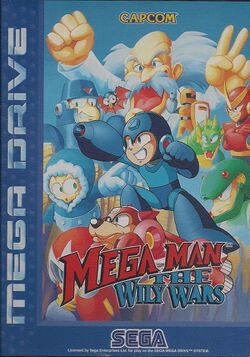
Mega Man: The Wily Wars, also known as Rockman Megaworld, is a video game that compiles the first three Mega Man games, Mega Man 1, Mega Man 2 and Mega Man 3 with some tweaks and a new visual style. In addition to those games, it comes with an unique mode, Wily Tower, where the bosses include Buster Rod G, Mega Water S and Hyper Storm H.